Overview of error handling
What are error handlers
Error handlers are tools in Make that allow you to deal with errors or unexpected events in your scenario. An error handler is connected to a module and is the last module of the error handling route. When the module outputs an error, the error handler prevents the scenario from stopping. Instead, it intercepts the error and executes the scenario based on the error handler’s configuration.
When to use error handlers
When your scenarios encounter errors, they hit a roadblock. If you have incomplete executions ON, your scenario stops and the execution is moved to the Incomplete executions tab. This is your manual queue. You must then manually intervene, identify the cause, fix the issue, and resume your scenario from where you left off.
If you find yourself manually fixing the same recurring errors, you can introduce error handlers to automate the recovery process. Instead of letting the scenario stop and wait for you, an error handler allows the scenario to follow a predefined logic, such as retrying the task automatically or skipping the error, keeping your workflows moving without your intervention.
For example: You built a scenario that syncs contacts from a web from to your CRM. A user fills out a form on your website. Your scenario takes that data and sends it to your CRM. Your CRM configuration requires a phone number, but some users leave that field blank on your form. When you run your scenario, it fails.
Without an error handler - The scenario stops. The contact isn't created in your CRM, and the execution moves to the Incomplete Executions tab (if enabled). You have to manually intervene, type in a dummy number such as "000-000-0000" in the phone number field, and continue.
With an error handler - To handle this issue, you add a Resume error handler. You instruct your Resume error handler to use a substitute value for missing phone numbers and continue the scenario. The scenario finishes successfully. The contact is created in HubSpot with the substitute date in the phone field, and you don't have to intervene further.
Since the error isn't a glitch that will fix itself (like a server being down), an incomplete execution would just sit there forever until you manually typed in a value. The Resume handler automates that for you by providing a substitute.
To maintain system reliability and operational integrity, Make automatically captures errors without stopping your scenarios or losing your data. This is done using Error handlers or error handling directives.
Make adheres to industry-standard error codes and definitions. However, it may be possible that the third party may not fully comply with these standards.
Different types of error handlers
The following topic provides a quick reference to working with error handlers in Make. If you want to learn more about individual error handlers, check the dedicated articles in this section of the Help Center.
There are five error handlers in Make:
Skip
The Skip error handler skips the error and removes the affected bundle from the scenario flow, allowing the scenario to continue with the next bundle. It’s useful when occasional invalid data is expected and doesn’t impact your process. It prevents the scenario from stopping and marks the run as successful, even if an error occurs.
Scenario stopped: No
Scenario status: Success
To learn more, see the Skip error handler page.
Retry
The Retry error handler removes the failing bundle from the scenario flow. It stores the error details and remaining steps as an incomplete execution, and allows the rest of the scenario to continue running. Make retries the incomplete scenario runs according to your configuration or stores them until you resolve them yourself. Make processes the rest of the bundles in the scenario flow normally. The scenario ends with a Warning status.
Scenario stopped: No
Scenario status: Warning
To learn more, see the Retry error handler page.
Resume
The Resume error handler replaces the failed module’s output with a predefined substitute output when an error occurs. If the module fails, the scenario continues to run using the substitute value in the subsequent steps. This allows the scenario to continue running smoothly using that data instead of stopping.
Scenario stopped: No
Scenario status: Success
To learn more, see the Resume error handler page.
Commit
The Commit error handler stops the scenario run and commits all changes made up to that point in the database apps. If the scenario doesn’t use transactional apps (such as MySQL or Data Store), the handler simply stops the scenario. Make doesn't process the rest of the modules in the scenario flow. The scenario ends with a Warning status.
Scenario stopped: Yes
Scenario status: Warning
To learn more, see the Commit error handlerCommit error handler page.
Rollback
Make stops the scenario run and reverts any changes in modules that support transactions. The remaining modules are not processed, the scenario is deactivated after repeated runs with errors, and the run ends with an error status.
Rollback is the default error handling if you don't set any error handling and when you keep incomplete executions disabled.
Scenario stopped: Yes
Scenario status: Error
To learn more, see the Rollback error handler page.
The error handling route
In Make, an error handling route is visually identified by a transparent, dotted connection. These routes define the logic path the scenario follows when a module encounters an exception.
When an error handler activates, it doesn't consume operations. Make doesn't bill you for handling unexpected events in your scenario.
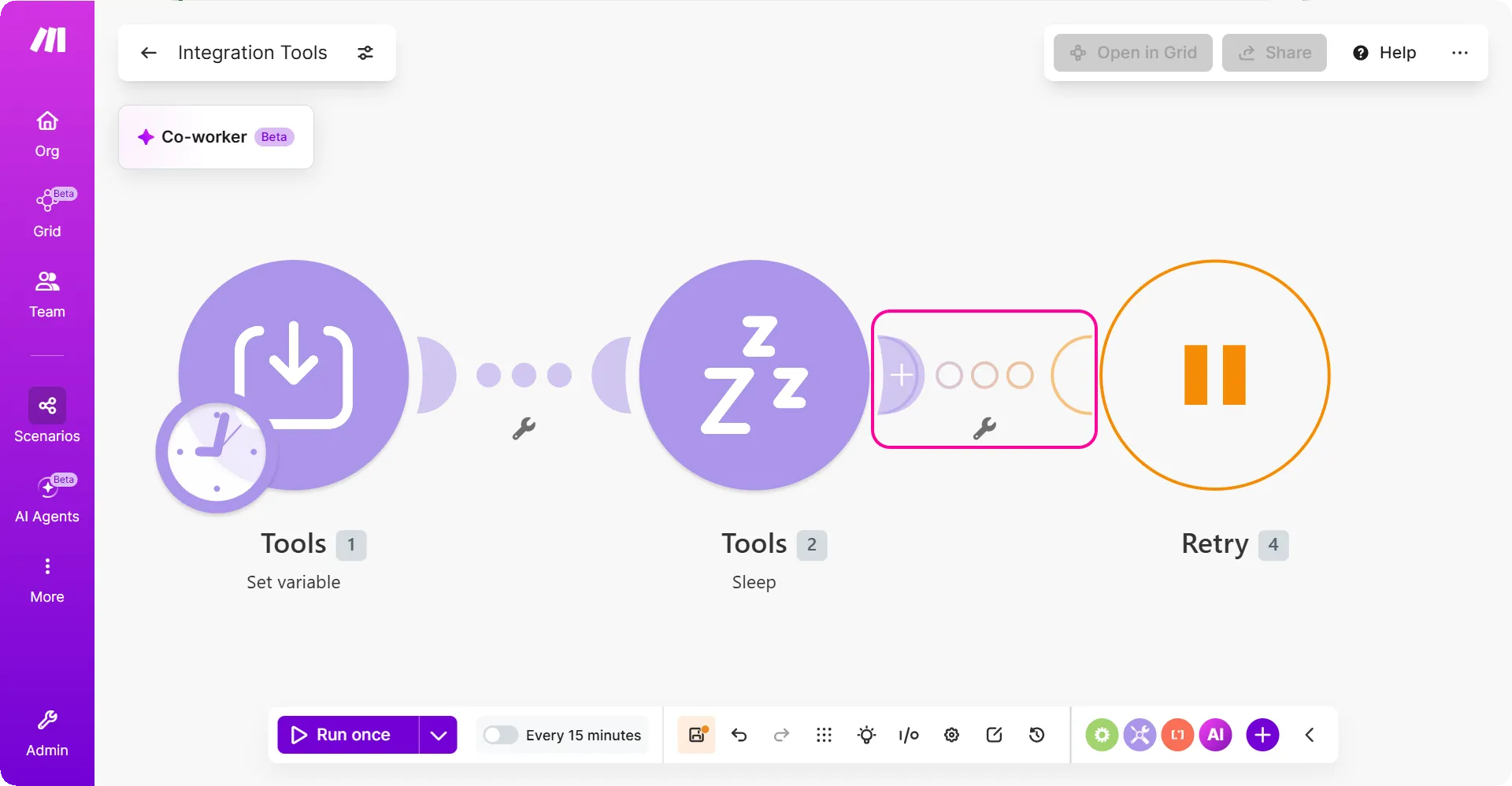
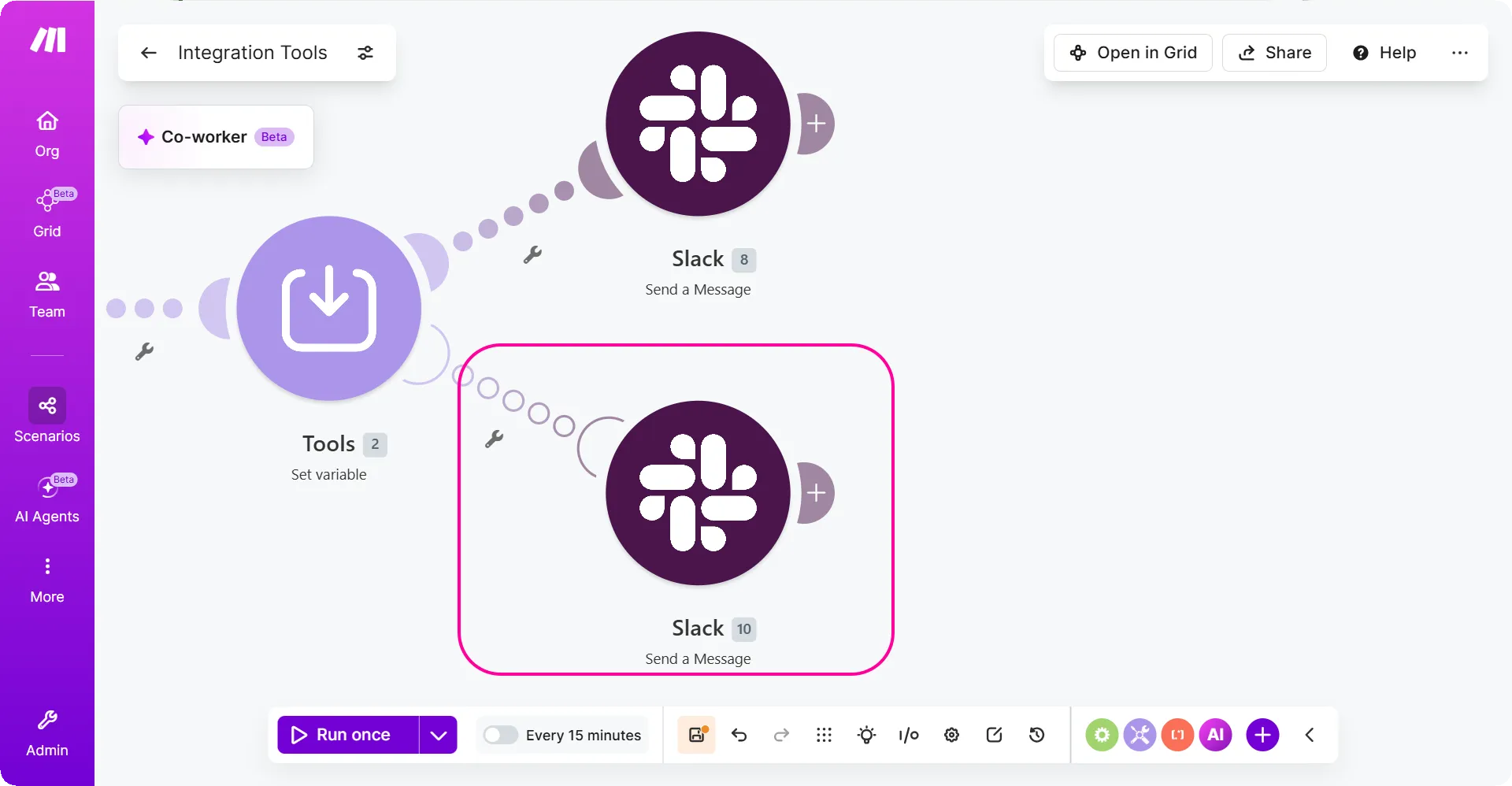
The error handling route doesn't have to have an error handler. For example, in the error handling route, there can be only a Slack > Create a message module to send you a Slack notification when an error occurs.
If no module outputs an error in the error handling route, Make skips the error. That means that the two error handling routes on the pictures work the same:
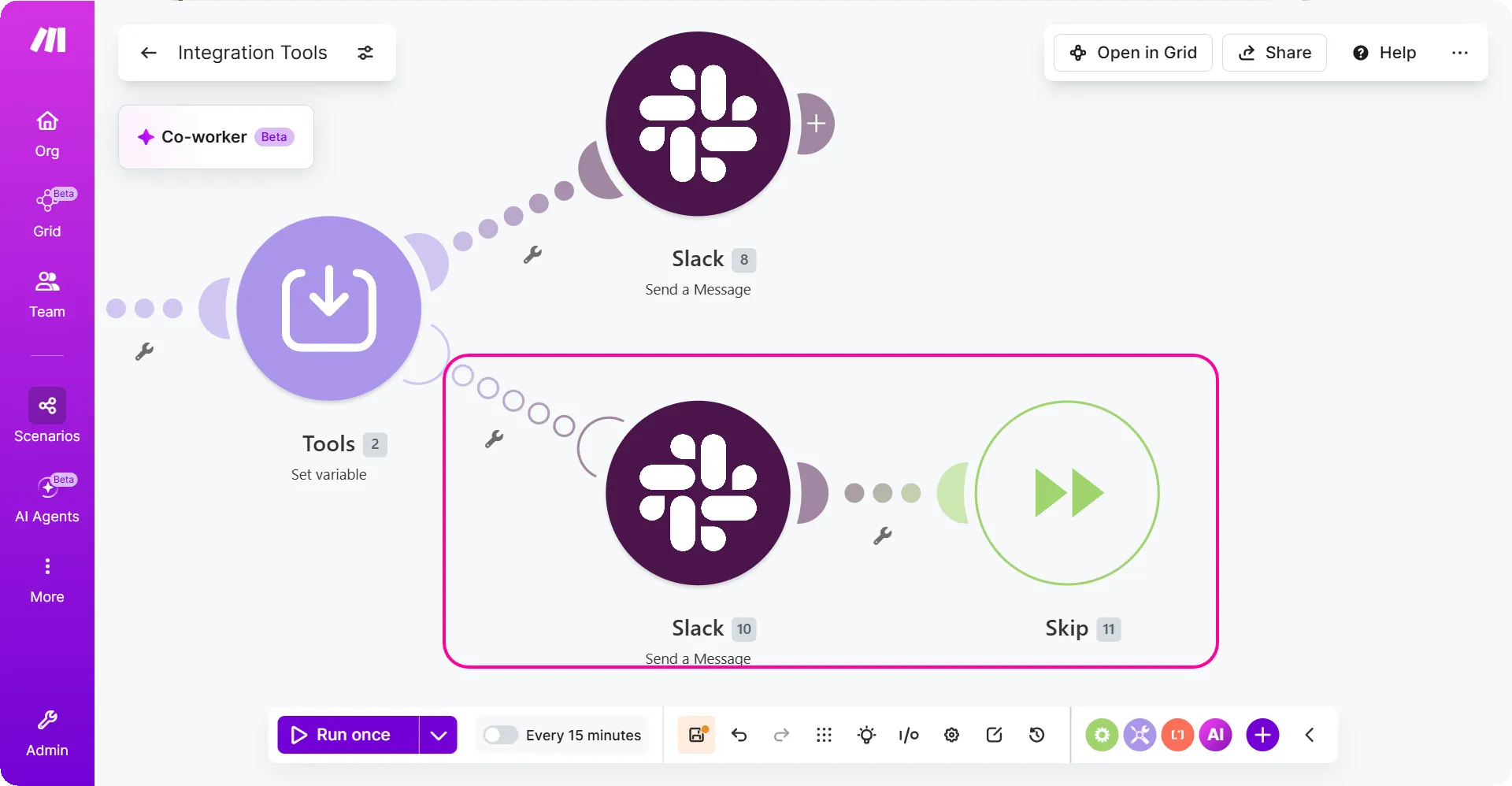
If a module in the error handling route outputs an error, the scenario run ends with an error.
How to approach error handling
You have multiple options on how to handle errors in Make. Make handles some of the most frequent errors by default, and you'll typically need custom error handling only when dealing with a specific issue.
The most frequent errors in running scenarios are the RateLimitError and ConnectionError. You can rely on the default error handling for these errors if you enable incomplete executions. The details of the error handling of these errors are in their dedicated articles.
If you need to handle a different error type or if you need to customize the default error handling, you should consider:
- How important is the data the scenario processes? For important scenarios, Make can store partial scenario runs in incomplete executions. You can resolve the incomplete scenario runs manually one by one or retry multiple of them at once.
- What type of error does the module output and how frequently? If the error occurs rarely and it's a temporary error, like the RateLimitError, you can rely on the default scenario error handling. But if the error is critical, like the InvalidAccessTokenError or the InconsistencyError, you should set up error handling.
- What is the impact of the error?
- If the error has no impact on your data or your processes, you could skip the error with the Skip error handler. If the error has a high impact on your processes, you should consider enabling incomplete executions in scenario settings.
For ideas about specific error handling strategies, you can check the list of dedicated articleslist of dedicated articles.
Scenario settings that impact error handling
The scenario settings play a key role in error handling. The following list focuses on how some scenario settings influence error handling. For more info about Make settings, check the dedicated articlededicated article.
Store incomplete executions
Enable this option to store the incomplete scenario run when a module in the scenario outputs an error.
With incomplete executions enabled, Make stores the scenario state when the error happened as an incomplete execution. You can then check the scenario run, investigate why the error happened, and fix it to finish the scenario run successfully. In addition, all scenario errors turn into warnings.
- When you use the Retry error handler in your scenario, you have to enable incomplete executions.
- Make doesn't store the incomplete scenario run in these conditions:
- When the error happens on the first module in the scenario. However, you can add the Retry error handler to the first module in the scenario. With the Retry error handler, Make stores the incomplete execution even when the first module in the scenario outputs an error.
- When your incomplete executions storage is full. If your incomplete executions storage is full, Make checks the enable data loss setting:
- If the data loss is disabled, Make disables the scenario.
- If the data loss is enabled, Make keeps scheduling scenario runs and discards the incomplete execution if it cannot be stored in your account.
You can read more about incomplete executions in the dedicated articlededicated article.
Behavior when any preceding module has unprocessed output bundles
When Store incomplete executions is enabled and a module fails while any preceding module still has output bundles waiting to be processed, the scenario does not stop. Instead: - The error is treated as a warning - the scenario continues running. - The failing bundle stops at the failing module and does not continue along its path. - The remaining pending bundles are processed immediately. - The errored execution is stored in the Incomplete Executions tab for review or retry. The preceding module in question can be anything that emits more than one bundle from a single operation - an Iterator, a Search or List module returning multiple results, or a Router pushing the same bundle through several routes.
Process data in order
Enable this option to postpone running the scenario until the previous run finishes and until all scenario incomplete executions are resolved. Process data in order makes sure that:
- The scenario runs finish in the same order as they were triggered.
- There is only one scenario execution running at the same time.
Process data in order has the highest impact on scenarios that start with an instant trigger (a webhook) or on scenarios that have incomplete executions enabled.
Scenarios that start with an instant trigger run in parallel by default. For example:
If you have a scenario that starts with a webhook that runs for 5 minutes and you receive a webhook bundle at 12:00 and another one at 12:03, then from 12:03 to 12:05 there will be two instances of the scenario running at the same time in parallel.
In addition, if the scenario instance that started at 12:00 runs longer than usual, for example, until 12:12, the Make instance that started at 12:03 finishes sooner (at 12:08), even though it started later.
If you want to make sure that the scenario doesn’t start before the previous run finishes, enable the Process data in order.
See Webhooks for more information.
The same applies to scenarios with the incomplete executions enabled. When there is an error and Make creates an incomplete execution, Make postpones the next scenario run until you resolve the incomplete execution or until it’s resolved automatically with the Retry error handler.
You can read more in the scenario settingsscenario settings.
Enable data loss
The enable data loss scenario setting influences the scenario incomplete executions storage. Enable this option to keep scheduling scenario runs regardless of not having enough space to store incomplete executions.
If you enable data loss, Make discards the data that doesn't fit into the size limits and continues running the scenario on schedule. Otherwise, Make disables the scenario scheduling instead.
Make sets the size limits based on your organization plan. Check the Make pricing or read more about the scenario settingsscenario settings.
Number of consecutive errors
This setting allows you to set how many times in a row the scenario can finish with an error and still keep being scheduled by Make for subsequent runs. When the scenario finishes with an error the specified number of times in a row, Make disables the scenario.
To access the setting of the number of consecutive errors, switch the advanced settings toggle in scenario settings. The default number of consecutive errors is 3.
The number of consecutive errors doesn't apply:
- When the scenario is triggered with an Instant triggers (webhook). Make disables instantly triggered scenario immediately if an error happens.
- When an error happens with one of the following types:
- AccountValidationError
- OperationsLimitExceededError
- DataSizeLimitExceededError Make disables the scenario scheduling immediately after the error happens.
- When you get a warning. If a scenario finishes with a warning, Make will keep scheduling subsequent scenario runs.
Auto-commit
Enable this option to commit changes right after they happen. For example, when a user triggers a scenario that updates their details.
If you disable this option, Make commits the changes after all modules execute successfully.
The setting affects only modules that support transactions. The modules supporting transactions are labeled with the "ACID" tag. They use a database app most of the time, like the Data Store or MySQL apps.
The modules that don't support transactions make changes immediately and don't provide the rollback functionality.
You can read more about the auto-commit option in the scenario settingsscenario settings article.
Commit trigger last
Enable this option to commit changes made by the first module in the scenario last. Otherwise, Make commits the changes in the same order as they happen.
The setting affects only modules that support transactions. The modules supporting transactions are labeled with the "ACID" tag. They use a database app most of the time, like the Data Store or MySQL apps.
The modules that don't support transactions make changes immediately and don't provide the rollback functionality.
You can read more about the commit trigger last option in the scenario settingsscenario settings article.