Retry error handler
When a scenario hits an error, the default behavior is often to simply stop. The Retry error handler allows you to pause a failed bundle, store the error message, mappings and the remaining scenario flow. Depending on the Retry error handler settings, Make retries the incomplete scenario either automatically or manually.
When to use it: Use the Retry error handler when you want to pause and potentially retry the failed run rather than just skipping or rolling back.
For example: A new order is placed and triggers a scenario. Tim uses Make to write the order data to the database. The database write fails due to a temporary connection issue. He adds the Retry error handler which pauses that bundle and stores the error, the order data, and the remaining scenario flow as an incomplete execution. Make continues processing any other orders in the queue. Make automatically retries the failed bundle after a set interval (e.g. 3 attempts, every 15 minutes) until the database connection is restored and the entry is successful. Once the database write completes, the confirmation email is sent as normal.
For more information about error handling strategies check the Overview of error handling .
How does the Retry error handler works
The Retry error handler acts as a time-out corner for a problematic module. Instead of stopping the whole scenario, the Retry handler pulls the failing bundle out of the flow. Make saves exactly what went wrong, including the error message and the data that caused it. Make processes the rest of the modulesin the scenario flow.
Automatic retry is most effective for temporary errors or errors where another attempt might be successful.
Make automatically retries the most frequent temporary errors, the ConnectionError and RateLimitError. You don't need the Retry error handler to automatically retry these types of errors.
To automatically retry the ConnectionError and RateLimitError, you only need to enable incomplete executions in scenario settings.
You can read more about automatic retry in the article about incomplete executions.
To use the Retry error handler in your scenario, you have to enable incomplete executions in scenario settings.
Use the Retry error handler
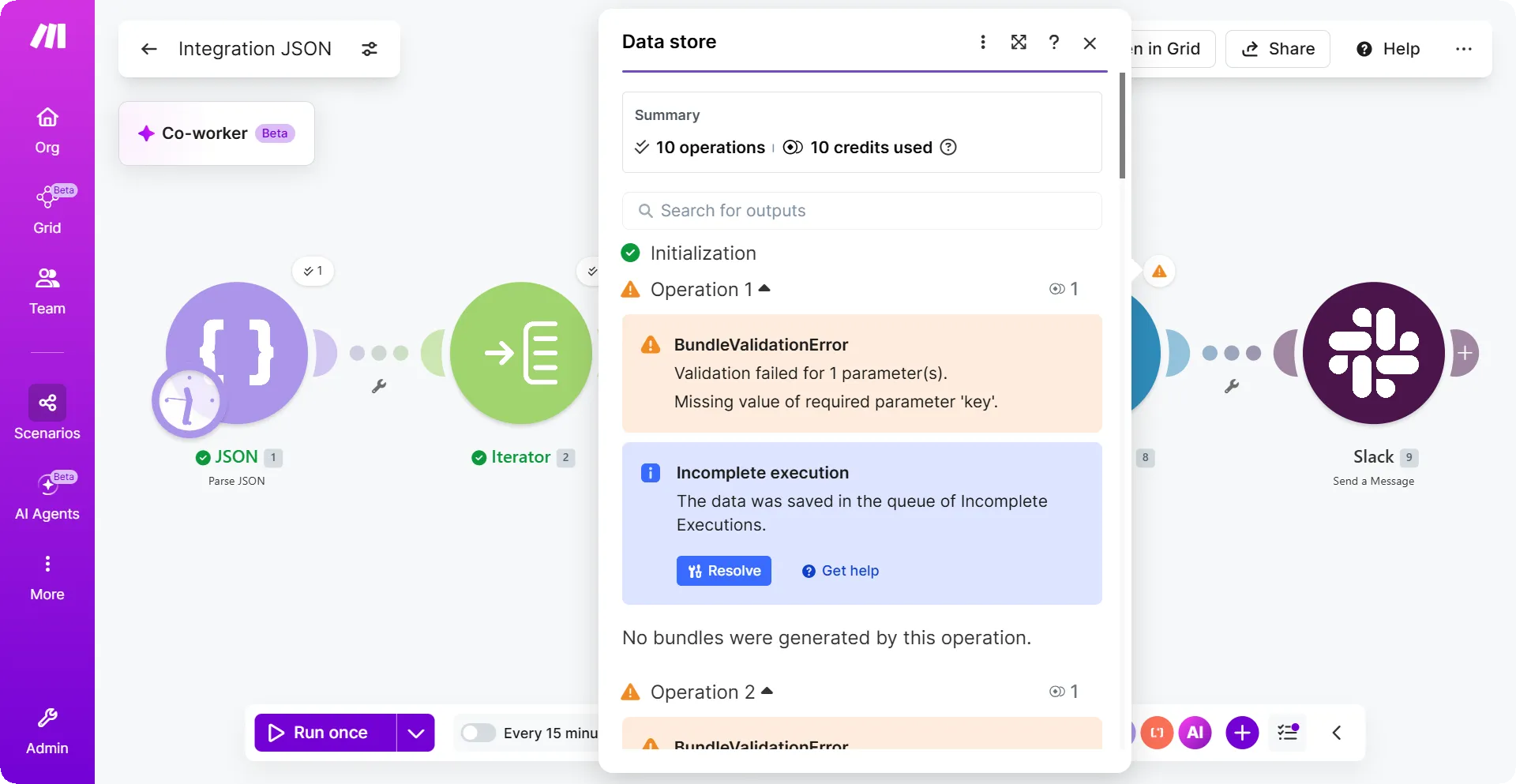
In this example, we have a scenario that updates a data store and then sends a Slack message. If the data store update fails because of a missing value (a BundleValidationError), a Slack message will never be sent.
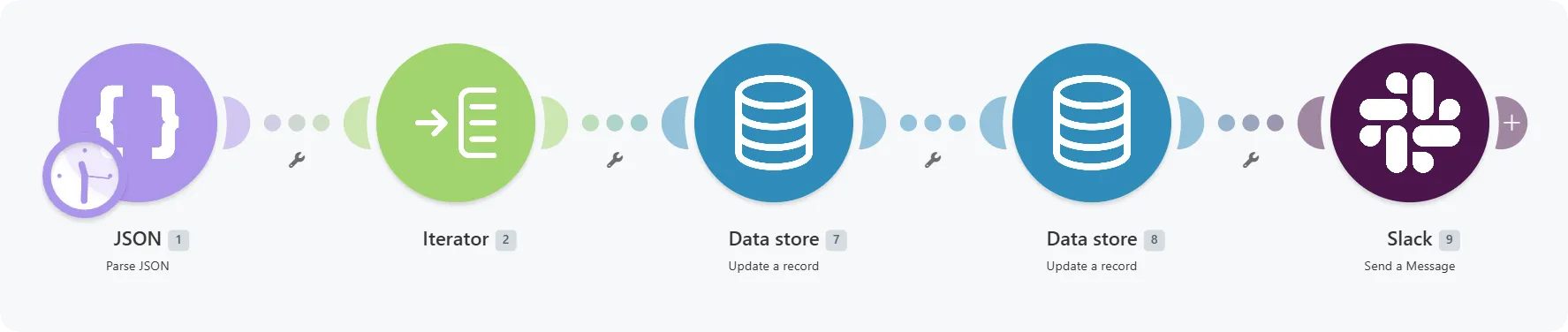
This demo scenario contains five modules.
- JSON - Parse JSON provides test data in the form of an array of ten record IDs.
- Iterator splits the array into individual bundles.
- Data store - Update a record Updates the data in the data store.
- Data store - Update a record This module updates the data again. This time the module works differently. In the module mapping, there is a mapping that intentionally creates an error:

The mapping inserts a null value into the required Key field, which always creates the BundleValidationError.
- Slack - Send a message: Sends a message to a private testing channel.
This is how the example scenario looks:
When we run the example scenario, we would get the BundleValidationError.
Let's see how to handle this error using a Retry error handler.
Right-click the data store module that failed and click Add error handler.
From the list of error handlers, click Retry.
Configure the Automatically complete execution by toggling between Yes or No.
If you set it as Yes, the system automatically retries depending upon the the number of attempts and the interval (e.g., try 3 more times, every 15 minutes).
If you leave this as No, the error will stay in your Incomplete Executions tab until you resolve it.
In the bottom panel, click the Scenario settings.
In Store incomplete executions, select Yes.
Click Save.
You've successfully added the Retry error handler to your scenario.
What happens when you run the scenario after you add a Retry error handler.
Here, we added the Retry error handler to the Update a record module, the Retry error handler would remove the bundle from the scenario flow.
When an error occurs in the Data store module, Make issues a warning and creates an incomplete execution. The incomplete execution contains the error message, scenario mappings and data.
Make would then process the remaining bundles in the scenario flow.
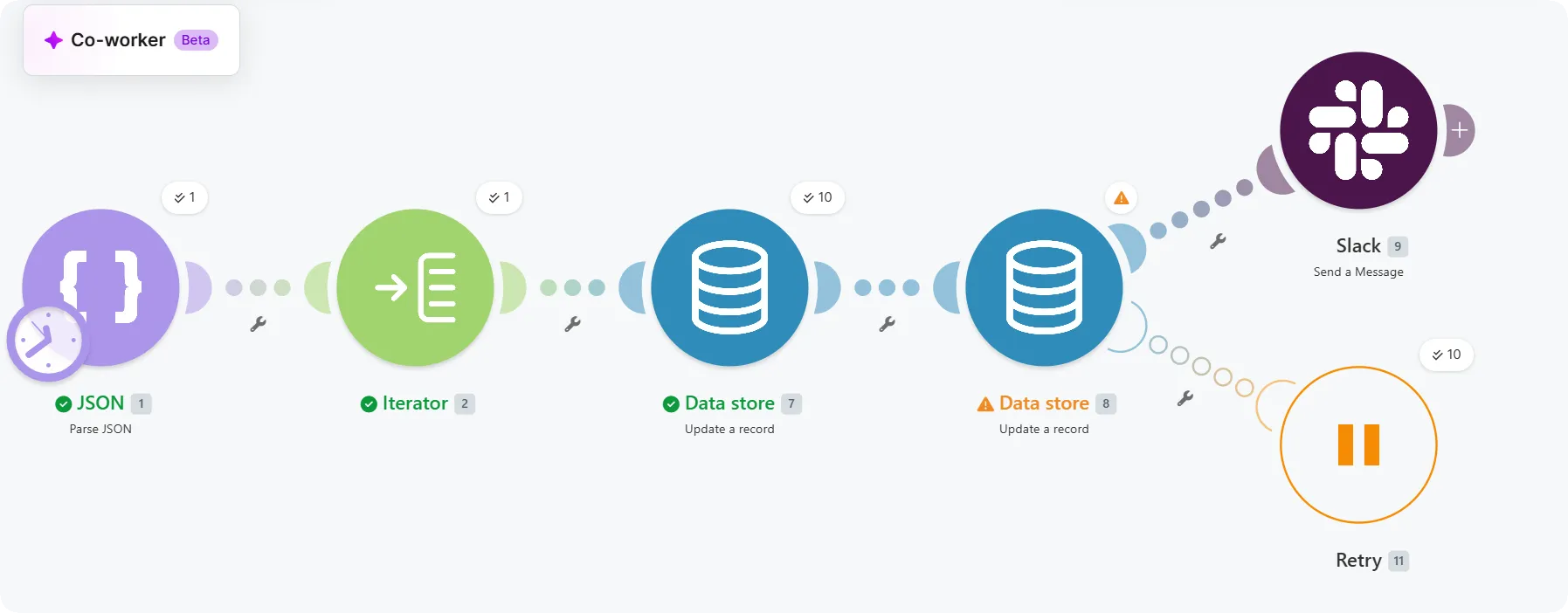
You can finish the scenario run in the incomplete executions tab manually or Make can finish the run automatically.
If you use the automatic scenario completion, Make attempts to finish the scenario automatically.