Introduction to errors and warnings
When an automation does not behave as expected, Make reports the issue as either a warning or an error, preventing your scenario from running. Errors and warnings can occur due to several reasons including connection issues, invalid mapping, API errors, etc.
Errors in Make
Errors indicate that your scenario encountered an unexpected event that was not handled by an error handler. As a result, you should review the scenario to identify and resolve the issue.
How to identify errors
A module will return an error when it receives invalid data from previous modules or from the app itself. When you open your scenario in the scenario editor, Make highlights the module that produced the error with an alert sign. To view the error type, click the alert sign displayed above the module.
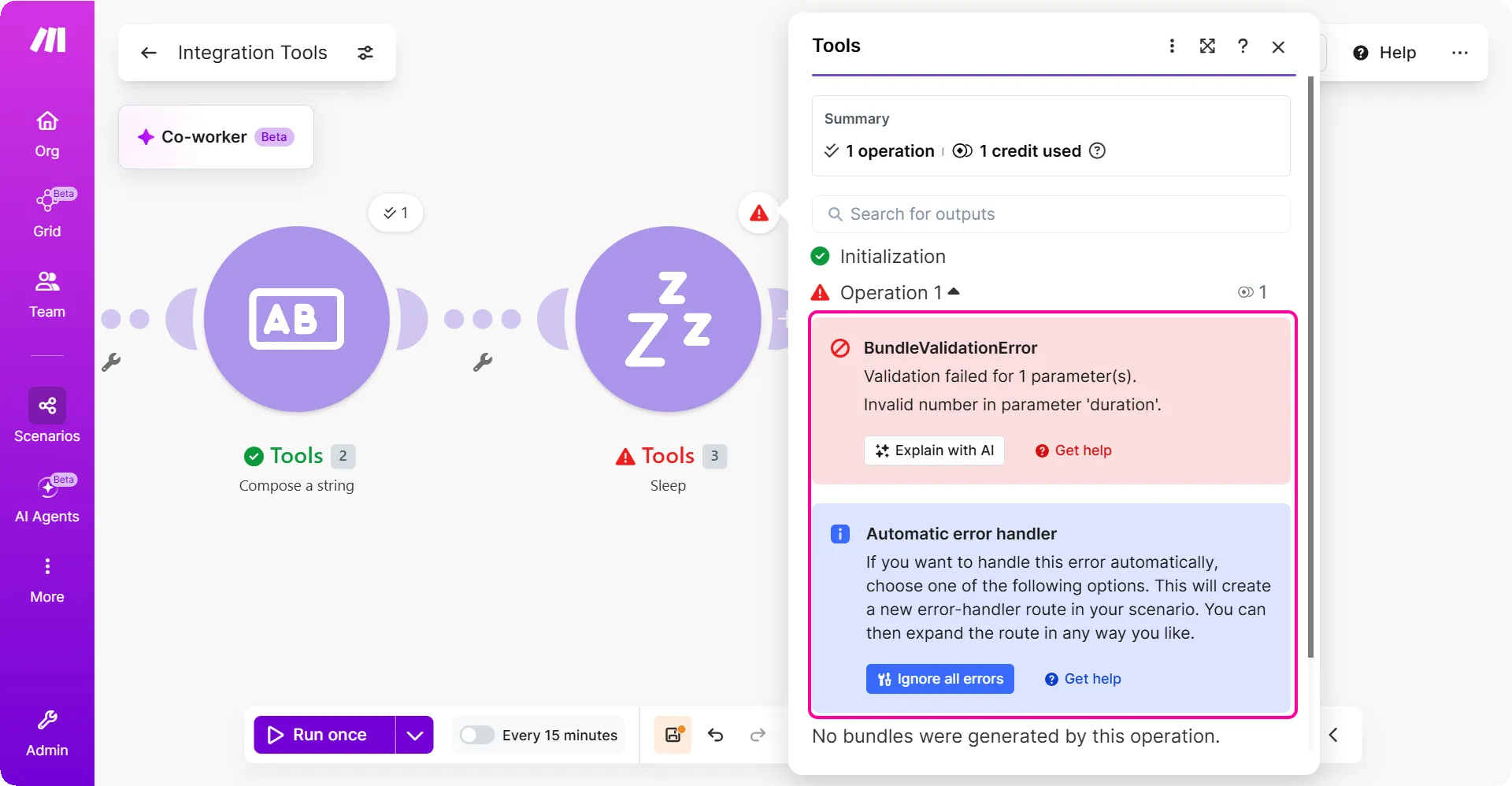
When you click the caution sign, you can check the bundle that caused the error in the module:
- Shows the error type and the error message.
- Different options to resolve this error
- The purple action button opens the Make Help Center in a pop-up window.
When a module outputs an error, Make stops the current scenario run and initiates a rollback. During this phase, Make attempts to revert any changes made before the error occurred, restoring the system to the state it was in prior to the scenario execution.
If a scenario encounters errors across multiple consecutive runs, Make automatically disables the scenario's schedule. Disabling the scenario prevents repeated failed executions, allowing you time to investigate and resolve the issue while avoiding unnecessary consumption of operations.
What causes errors in Make
The following are the most common reasons that can cause a module to return an error:
Data handling:
These errors occur when there are issues with the data transferred between modules. An error may arise if the data is incorrect or not in the right format. Make ensures that only valid data is processed in a scenario.
Error examples:
Organization limits:
As per your plan, you have resources allotted for your organization. Exceeding these resource limits in your plan will prevent your scenarios from running.
Error examples:
- Max File Size Exceeded ErrorDataSizeLimitExceededError
API related:
These errors can occur due to the changes to APIs, authentication or authorization settings. An error may occur due to changes in the connection, such as expired API keys, unavailable APIs, or revoked access after team or permission changes.
Error examples:
How errors are categorized
Make classifies errors based on two primary factors, their origin and their underlying cause.
Example: A ConnectionError typically occurs when a third-party service is having an issue or incident. In this case, the origin is the external server, and the cause is the inability to establish a connection.
Error notifications
When errors are not handled by any error handler, Make sends you an email notification:

Make also sends out a notification when your scenario gets disabled because of repeated errors.
You can learn more about Make email notifications and their settings here.
Warnings in Make
Warnings alert you that there was an issue during the scenario run, but not as serious as an error. Also, scenarios can have a Warning status if errors are successfully handled by your configured error handlers or incomplete executions.
When a module in a scenario returns a warning, your scenario keeps running and stays enabled. A warning doesn't disable the scheduling of your scenario and warnings don't count into the number of consecutive errors. But it's a good idea to check the scenario execution historyscenario execution history to view the cause of the warning.
A warning can also be the result of handling an error with the Retry error handler. With the warning Make informs you that the Retry error handler created an incomplete executionincomplete execution of your scenario.
When a module returns a warning, Make highlights the module with a yellow caution sign. To check the warning, click the caution sign displayed above the module.
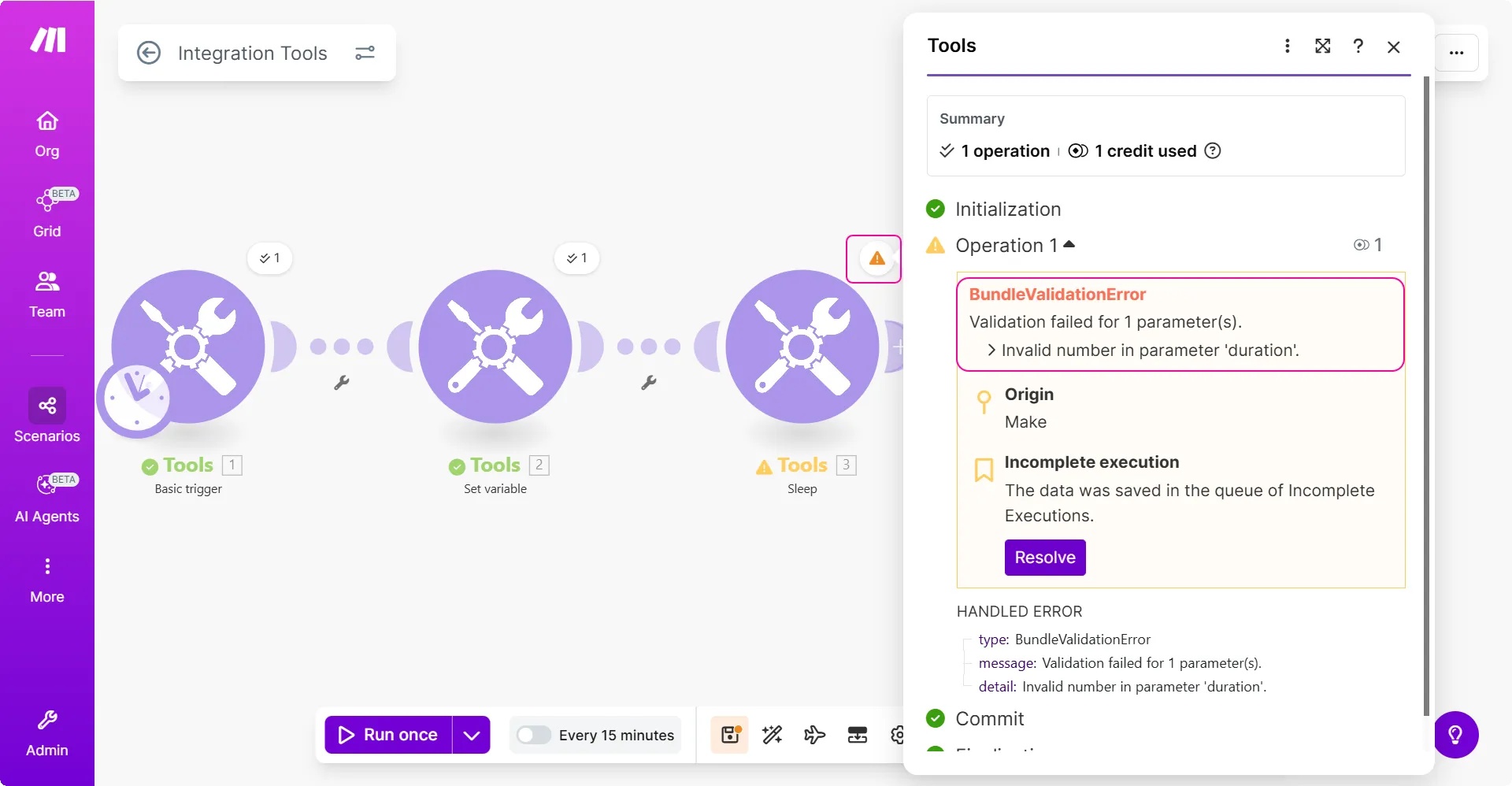
When you use error handler, you will see a warning when the error handler activates. In the example above, the Retry error handler handled the BundleValidationError. The error handler activation turned the original error into a warning.
The following are the most common scenarios that cause a module to return a warning:
- When a module outputs an error, but you have enabled the storing of incomplete executionsstoring of incomplete executions in the scenario settings.
- When the data store used in a scenario reaches its capacity limit.
- When the execution time of a scenario run exceeds the duration limit of your subscription.