Introduction to Make AI Agent (New)
This page and the following pages reflect the new version of the Make AI Agent (New) app released on February 2nd, 2026.
The Make AI Agent (New) app is available in open beta, so product functionality and pricing may change. The app is available on all plans using Make's AI Provider, with the option to use custom AI provider connections on paid plans.
An AI agent is an AI system that independently performs tasks for you based on your instructions. In Make, AI agent refers to Make AI Agent (New), an app that you use to create agentic scenarios.
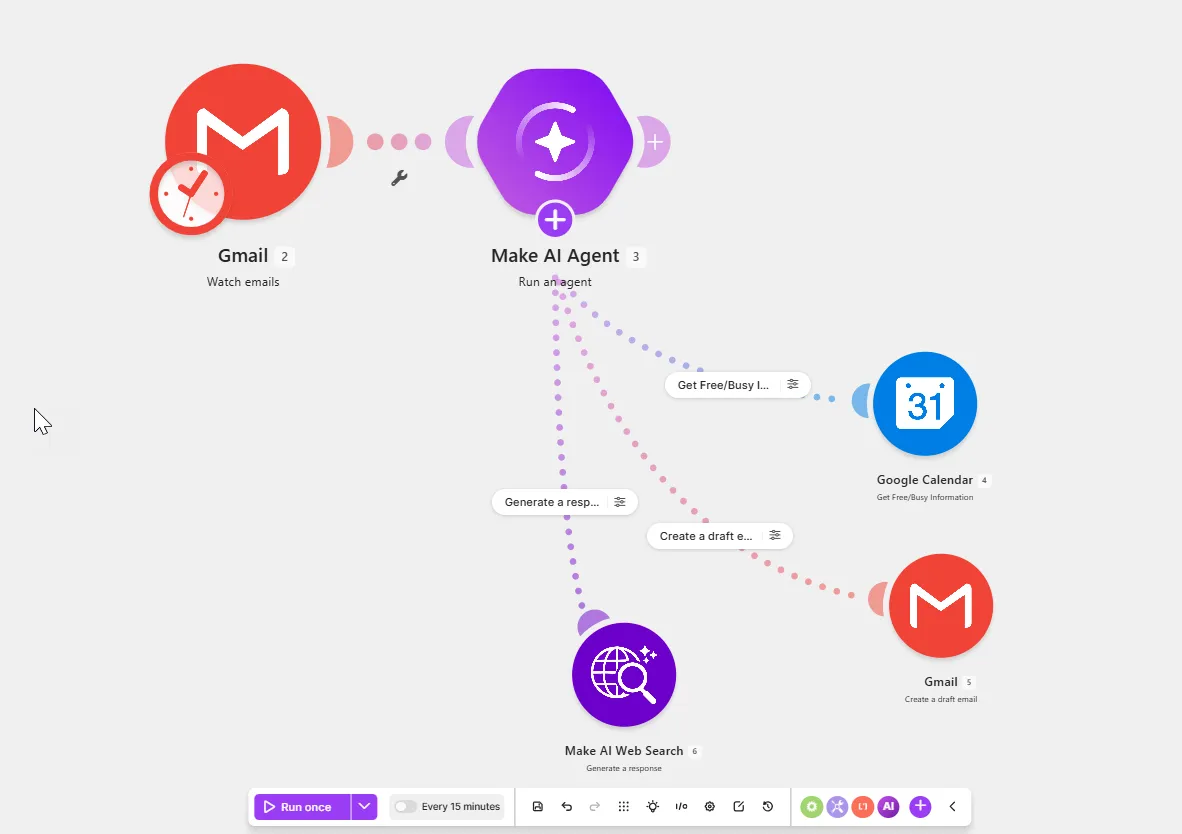
In this introductory guide to AI agents in Make, learn about their key concepts, when to use agents, and where to go next to start building.
Key concepts
In Make, agents use these core concepts:
- A large language model (LLM) is like a brain that the agent uses to think and make decisions. Without it, the agent can't understand or respond to requests.
- An AI provider connects the agent to an LLM. Common AI providers include OpenAI, Gemini, and Anthropic Claude. Make's AI Provider connects to LLMs without needing an account with a provider.
- Reasoning shows you the agent's step-by-step thinking, so you can understand each of its decisions and debug when something goes wrong.
- Instructions are guidelines that define the agent's role and how it should behave. They include goals, the steps to achieve them, and other rules to follow across all tasks.
- Knowledge is reference information that the agent uses to tailor its responses to your goals. It consists of files stored in the agent's memory, for example, FAQs, brand guidelines, company policies, and internal documentation.
- Input is variable information that the agent processes each time it runs. It includes specific requests and data from third-party services, such as Slack messages.
- Tools connect agents to third-party services, such as email, database, and CRM systems, to allow them to perform specific tasks. In Make, tools are modules, scenarios, MCP server tools, and other agents.
- Files are task-specific documents that the agent processes and uses in tools, such as email attachments or chat message files.
Agents are in scenarios (automated workflows), so some familiarity with Make is helpful when you create them. For an introduction to Make-specific concepts, refer to Key concepts.
When to use AI agents
When deciding whether to use agents in scenarios, consider these guidelines:
- Use a scenario with an agent for tasks that require flexible reasoning, judgment calls, and variable inputs and outputs. Examples: categorizing support tickets, screening candidates, and analyzing market data.
- Use a scenario with an AI app for tasks that combine predefined logic with AI-generated content, where both inputs and outputs follow specific parameters. Examples: translating, transcribing, and summarizing documents.
- Use a standard scenario for tasks with predefined logic that always produce the same output for a given input. Examples: syncing data between services, processing orders, and updating customer management systems.
Since AI systems provide unpredictable results, choose tasks for your agent that you trust an intern to handle. Avoid tasks involving sensitive data, high-stakes financial or strategic decisions, or strict legal requirements.
AI agent examples
This table outlines common examples of AI agents to try:
Agent | What it does |
|---|---|
Customer support ticket triage | Categorizes, prioritizes, and assigns customer support tickets to team members |
Sales outreach | Identifies potential leads, researches them, schedules meetings, and sends email invitations |
Content marketing | Creates blogs, social media content, and other materials and automatically posts them to social media channels |
Market research analyst | Gathers company information online, saves the data in a database, and analyzes the collected data |
Candidate screening | Analyzes candidate resumes against job requirements, creates a form that qualifies each candidate, and shares the form with recruiters and interviewers |
SEO optimization | Analyzes content for SEO and creates a report with recommendations |
To build other agentic scenarios like this one using pre-built templates, see Make AI agent library.
What's next
To get started with the Make AI Agent (New) app, see these resources:
- Create your first AI agent to build an agent from the beginning
- Sales outreach AI agent to walk through a guided use case
- The Automation to AI Agents course from Make Academy for more hands-on practice