Fix rate limit errors
In Make, you'll see the RateLimitError when requests to an app have exceeded its API rate limit—the maximum number of requests allowed within a certain time period (e.g., 100 requests per minute). When its rate limit is exceeded, the app blocks further requests until the specified timeframe passes. For an example, see the API rate limits for Google Sheets.
The rate limit error is common in scenarios with instant triggers (e.g., webhooks), apps that process many records in a short time (e.g., Google Sheets or Airtable), and apps that you use multiple times across scenarios.
This article outlines strategies for preventing rate limit errors in instant scenarios, scheduled scenarios, and both types.
The rate limit error in Make corresponds to the HTTP 429 Too Many Requests error code. While Make follows the standard error codes and their definitions, third-party apps may not always comply with this standard.
Strategies by scheduling type
When a module returns the rate limit error and no error handler is present, Make responds based on the following factors:
- The scenario scheduling type
- Whether incomplete executions are enabled
The chart below outlines all possible responses to encountering a rate limit error:
Scheduling type | Incomplete executions disabled | Incomplete executions enabled |
|---|---|---|
Scheduled |
|
|
Instant | Make reruns the incomplete execution from its start with exponential backoff. | Make reruns the incomplete execution with exponential backoff. |
The strategies to avoid rate limit errors depend on whether a scenario receives data instantly, with instant triggers, or on a scheduled basis.
Instant scenarios
In instantly triggered scenarios, set a scenario rate limit to control how often a scenario runs per minute. This strategy spreads sudden spikes in requests over longer periods, enabling queued requests to be processed at a manageable rate.
You can configure a scenario rate limit in the Maximum runs to start per minute field. Find this setting by clicking the lightning icon on the instant trigger module or Schedule setting in the scenario toolbar.
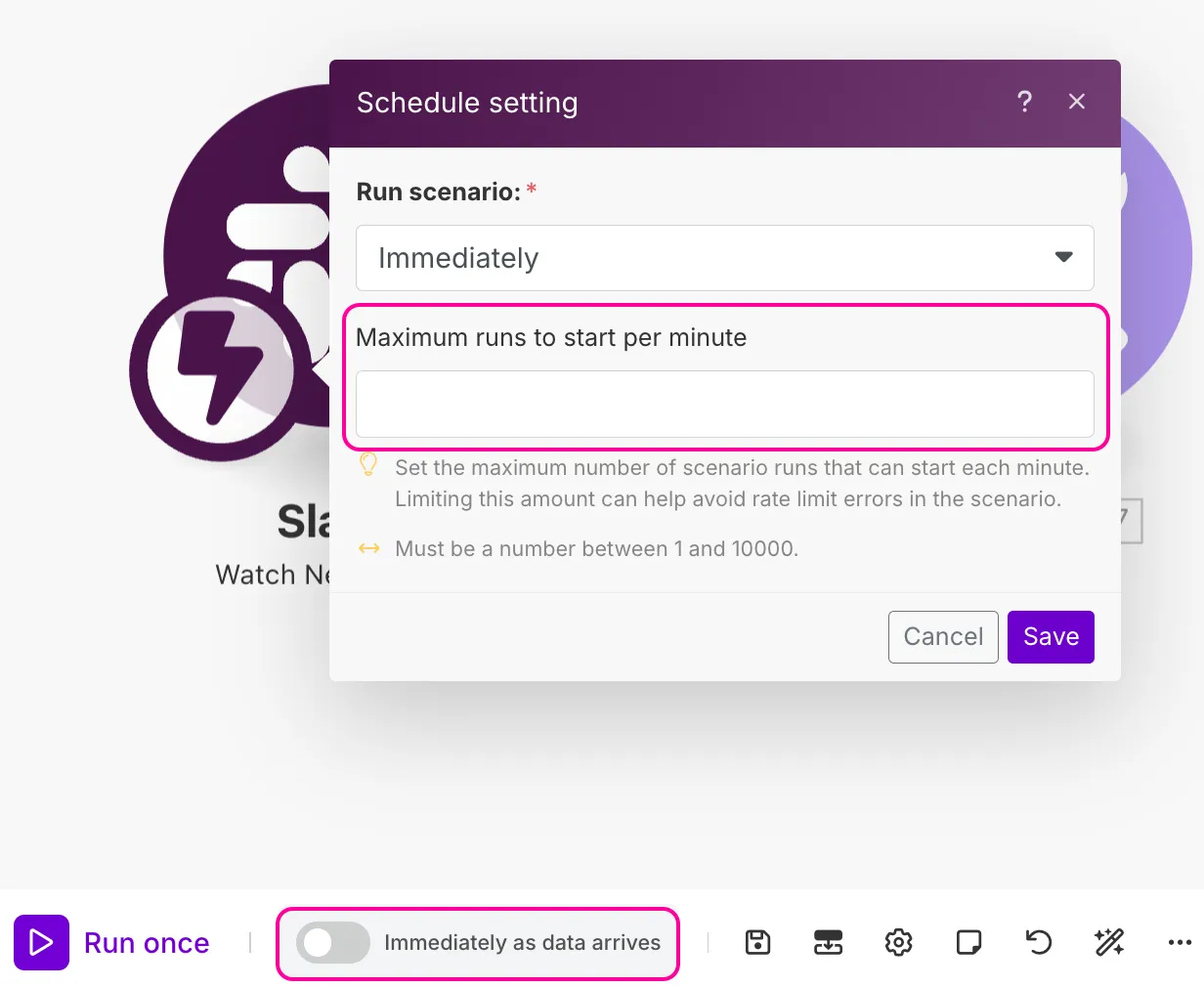
You can also enable Process data in order or use sleep modules. However, these strategies have limitations and are useful in select cases. See Advanced strategies to learn more.
Scheduled scenarios
In scheduled scenarios (e.g., with polling triggers), you can try these strategies, depending on your use case:
Set longer scheduling intervals
When you expect many data records in a single run, prolong the time between scenario runs to spread incoming records over a longer period. For example, schedule your scenario to run every 5 minutes and process 100 rows per run.
You can configure scheduling intervals in Schedule settings in the scenario toolbar.
Set a low number of records to process per run
If you require frequent scenario runs, such as one run per minute, lower the number of records processed per run. A limit of up to 20 records per run is recommended to avoid exceeding rate limits. For example, schedule your scenario to run every minute and process 20 rows per run.
You can configure a records-per-run limit in a module's settings in the Limit field.
Both types (instant and scheduled scenarios)
Regardless of the scenario scheduling type, you can do the following to reduce requests and prevent rate limit errors:
- Use bulk action modules, such as Google Sheets > Bulk Add Rows and Bulk Update Rows, to process multiple bundles in a single request. For example, requesting once to Google Sheets to add 20 rows to a spreadsheet, rather than 20 times—once per row.
- Use aggregator modules to merge several bundles into a single bundle.
- Add a short delay by adding a Sleep module before an error-causing module if rate limit errors continue.
For more strategies, continue to the next section.
Advanced strategies
This section includes more rate-limit error strategies to try when the ones mentioned are less effective or relevant to your use case.
Process data in order
When you enable Process data in order, the trigger module processes incoming data one by one, in the order they arrive, rather than in parallel. Make waits until a scenario run is complete before starting the next one.
You can enable Process data in order in Scenario settings in the Scenario Builder.
Limitations
Process data in order stops the scenario in the event of errors, even with incomplete executions disabled. If a scenario has incomplete executions and Process data in order enabled, the scenario pauses until incomplete executions are processed to maintain the order of incoming data.
Sleep module
The Sleep module delays requests to an app for up to 300 seconds, or 5 minutes. Set the delay to align with the number of requests allowed in the rate limit. For example, if the app is limited to 10 requests per minute, set the delay to 6 seconds.
You can add a Sleep module before the module receiving the delayed requests.
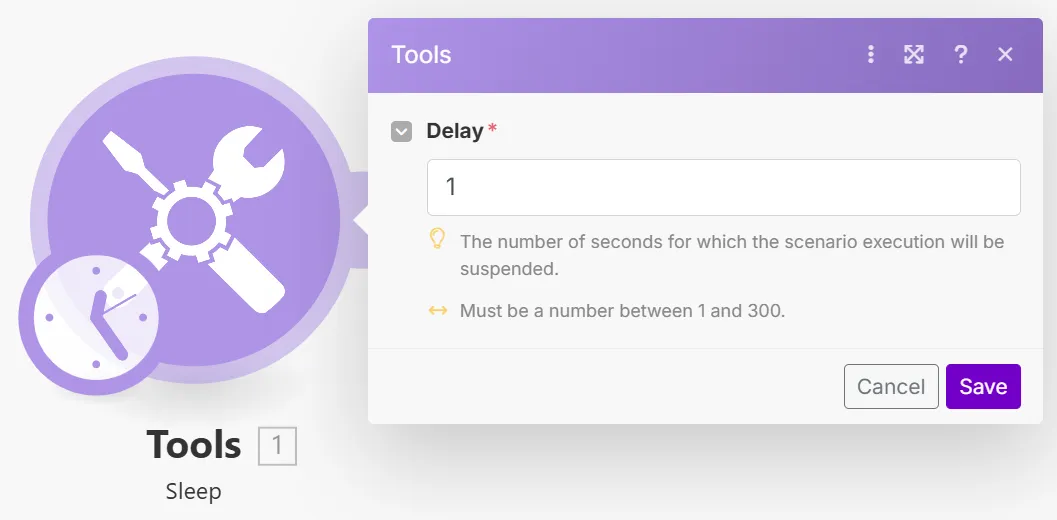
Use sleep modules to address rate limit errors in these cases:
- In instant scenarios with multiple modules of the same app
- In scenarios with modules that run multiple times to process many bundles (e.g., 10)
Limitations
Apart from slowing down runtime, Sleep modules often delay the issues causing rate limit errors rather than solve them. For example, when requests that occur in rapid succession reach the Sleep module, the module only delays these problematic requests for a couple of seconds.
Incomplete executions
When you enable incomplete executions, you can address errors later and keep scenarios running.
If a rate limit error occurs with incomplete executions enabled, Make automatically reruns the incomplete execution in gradually increasing intervals. In most cases, this automatic rerun solves the issue, and the scenario run continues as normal. You'll only need to manually resolve errors in case of logical errors (e.g., incorrect mapping, filter conditions, etc.).
To enable incomplete executions, select Yes in the Store incomplete executions field in Scenario settings.
An app counts the number of requests towards its rate limit in all scenarios using the app.
If your scenario includes a module that consumes many operations, or you frequently use the same module in your scenarios, consider checking the app's API rate limit or using the error handling strategies in this article to preemptively avoid frequent scenario runs.