Clone a scenario
In Make, you can clone scenarios within the same organization, either within your team or to a different team. This saves you time as you don't need to rebuild the scenario and reconfigure each module manually.
Cloning allows you to:
- Copy a scenario within the same team with all the module settings and connections. You will only need to set up the webhooks if there are any.
- Copy a scenario to another team within the same organization with all the module settings. You will only need to set up the required connections for the target team and the webhooks, if there are any.
Cloning is the fastest way to duplicate a scenario within your organization compared to blueprints, templates, or sharing through a link.
Clone scenario
To clone a scenario:
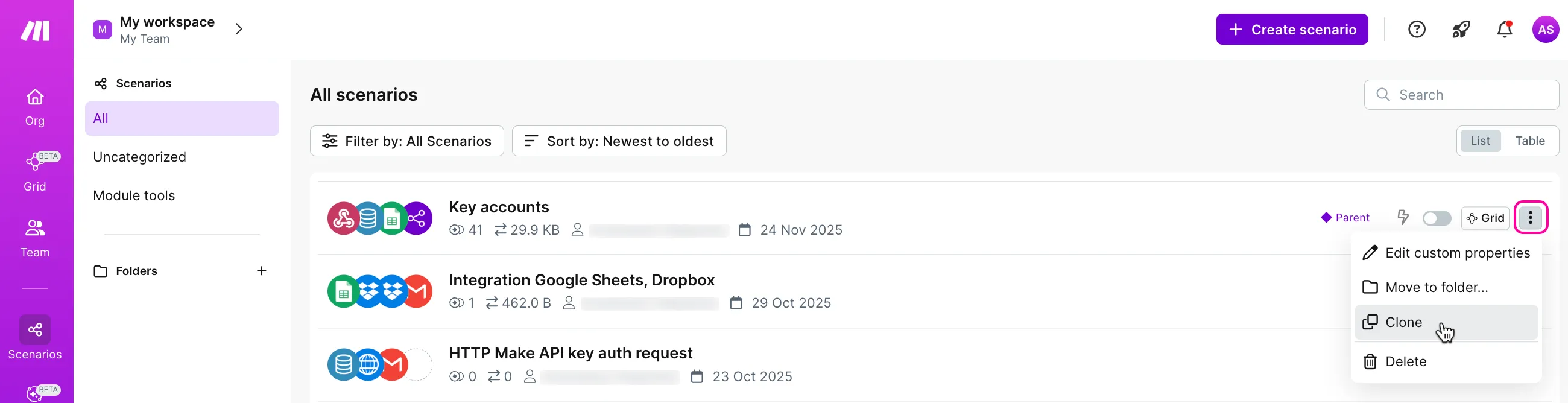
In the left sidebar, click Scenarios.
Click the three dots > Clone next to the required scenario.
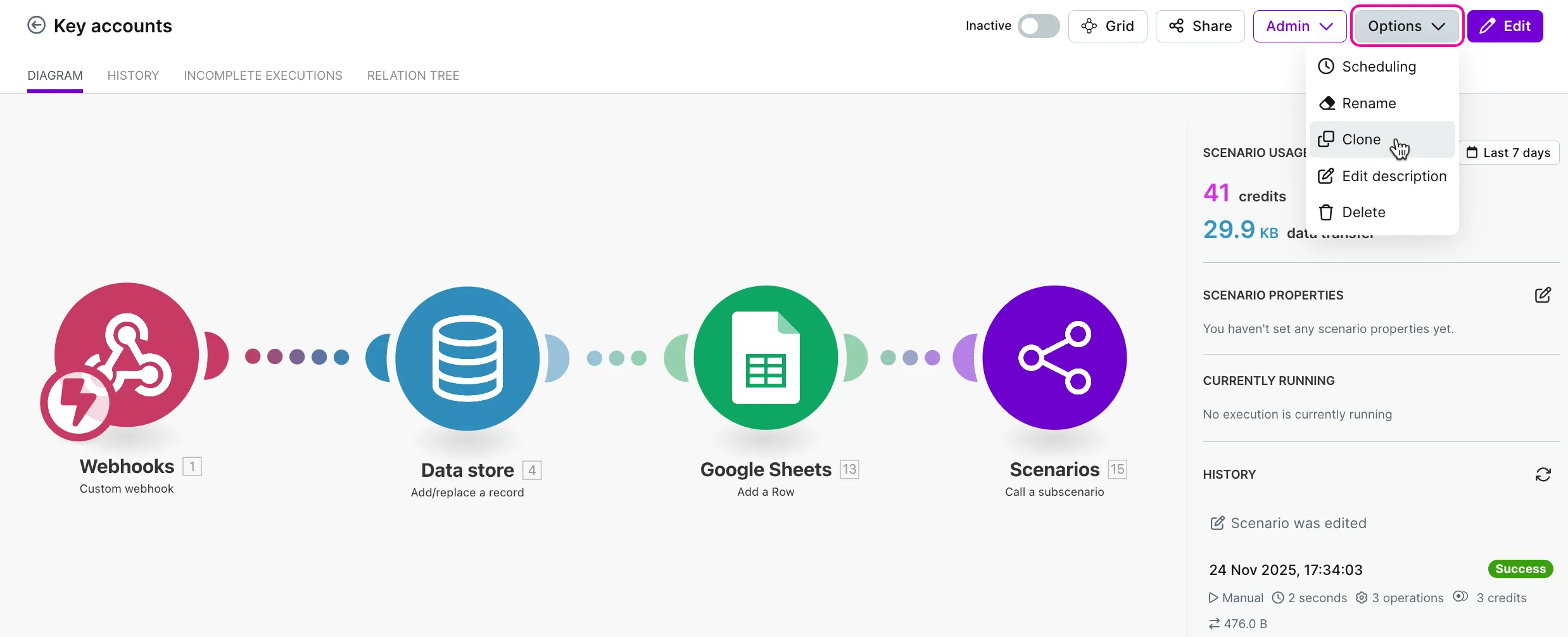
Alternatively, click the required scenario. In the upper-right corner of the scenario diagram, click Options > Clone.
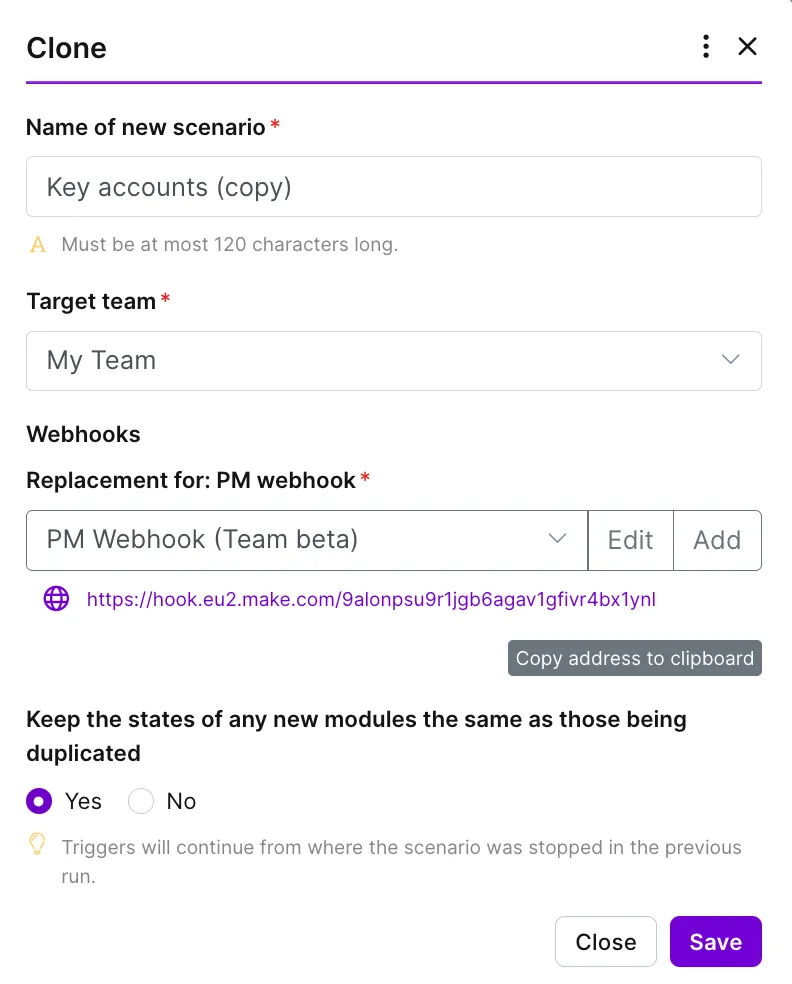
You will see a window to configure the cloned scenario.
Clone scenario within your team
When cloning a scenario within your team, configure it as follows:
In the Name of new scenario field, change the scenario name if needed.
In the Target team field, keep your current team that is selected by default.
In Webhooks (if your scenario includes webhooks), select an existing webhook or create a new one that will replace the original.
In the Keep the states of any new modules the same as those being duplicated field, choose whether polling triggers in the cloned scenario should keep their state.
- If you select Yes, the trigger will continue from the last processed item in the original scenario.
- If you select No, the scenario will start from the initial position, as defined in the module settings.
Example: You have a scenario with the Google Sheets > Watch New Rows module set to return one output per execution cycle. You ran the original scenario twice and now want to clone it.
- If you select Yes, the cloned scenario will start from row 3.
- If you select No, the cloned scenario will start from row 1.
Click Save.
After saving the cloning configurations, you will be redirected to the cloned scenario diagram. Click Edit in the upper-right corner, or anywhere in the canvas, make any necessary adjustments, activate the scenario, if needed, and save your changes.
Clone scenario to another team
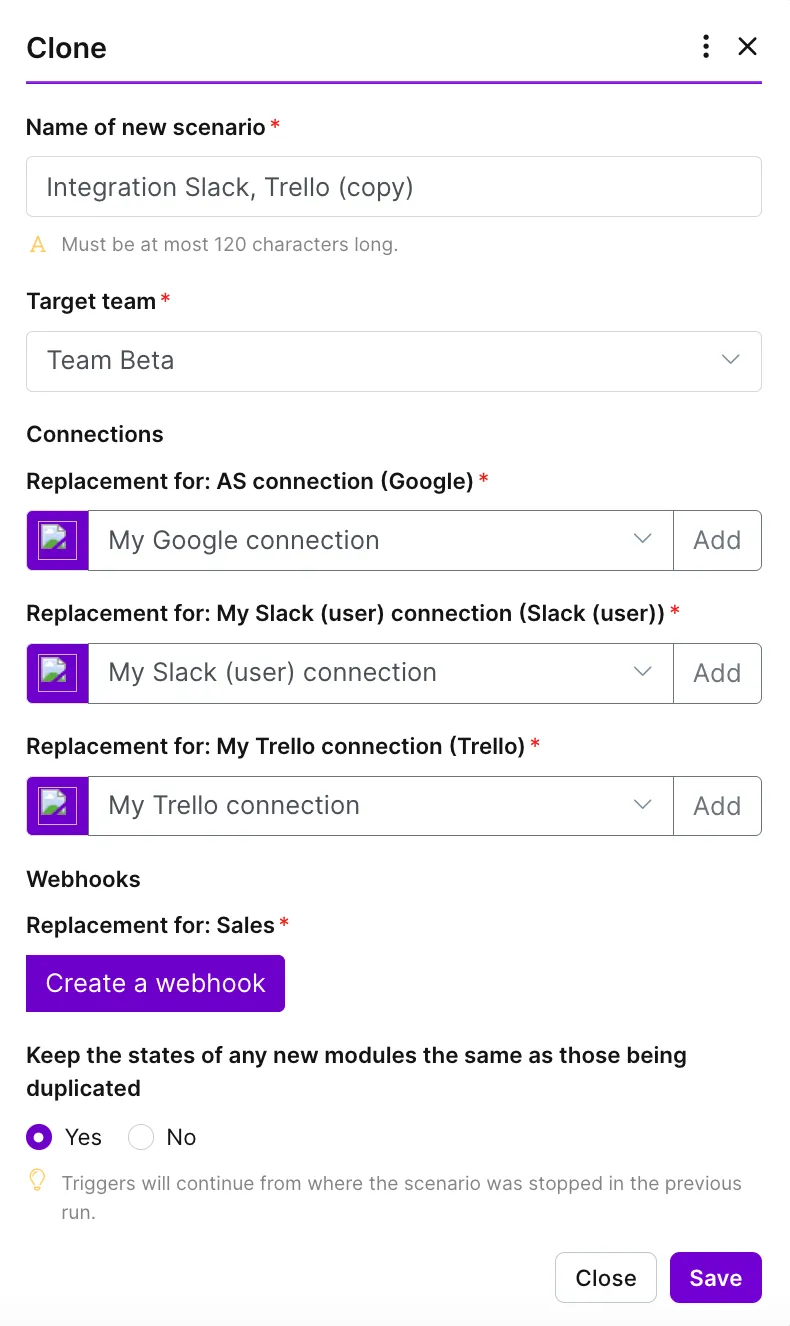
To clone a scenario to another team, configure the cloned scenario as follows:
In the Name of new scenario field, change the scenario name if needed.
In the Target team field, choose the team to clone the scenario to.
In Connections, for each module included in the cloned scenario, select the connections from the target team or create new ones.
Make sure to adjust and review the module settings after selecting a different connection.
Example: You're cloning a scenario that includes the Google Sheets > Watch New Rows module and select a connection from the target team. The module settings will be prefilled with data from the original scenario. However, the new connection may not have access to certain elements, e.g., the selected spreadsheet. If you run the scenario without adjusting the module settings, it will return an error.
In Webhooks (if your scenario includes webhooks), create a webhook that will replace the original one.
In the Keep the states of any new modules the same as those being duplicated field, select whether polling triggers in the cloned scenario should keep their state.
- If you select Yes, the trigger will continue from the last processed item in the original scenario.
- If you select No, the scenario will start from the initial position, as defined in the module settings.
This option applies only if you use the same connection in both the original and cloned scenarios.
If you select a different connection, the cloned scenario will start from the initial position regardless of the option selected.
Click Save.
After saving the cloning configurations, the cloned scenario will appear in the Scenarios list of the selected target team.
You will be redirected to the cloned scenario diagram. Click Edit in the upper-right corner, or anywhere in the canvas, make any necessary adjustments, activate the scenario, if needed, and save your changes.